---
title: "GA4 Page Links: open the right page from Google Analytics"
description: "Open Google Analytics report paths on the right domain. Set up GA4 Page Links for each property and check whether the page shows the expected product variant."
url: "https://cookingmetrics.com/blog/ga4-page-links/"
markdown_url: "https://cookingmetrics.com/blog/ga4-page-links.md"
lang: "en"
date_published: "2026-11-12"
author: "Martín Garay"
author_url: "https://cookingmetrics.com/about-martin-garay/"
publisher: "CookingMetrics"
publisher_url: "https://cookingmetrics.com/"
keywords: ["Cases and lessons learned"]
citation_apa7: "Garay, M. (2026, November 12). *GA4 Page Links: open the right page from Google Analytics*. CookingMetrics. https://cookingmetrics.com/blog/ga4-page-links/"
references_apa7:
- "CookingMetrics, GitHub. (n.d.). *GA4 Page Links 0.2.0*. https://github.com/martingaray/ga4-page-links/releases/tag/v0.2.0"
- "CookingMetrics, GitHub. (n.d.). *GA4 Page Links: validation (0.2.0)*. https://github.com/martingaray/ga4-page-links/blob/v0.2.0/docs/VALIDATION.md"
- "Google Analytics Help. (n.d.). *Pages and screens report*. https://support.google.com/analytics/answer/12926732"
- "Google Analytics Help. (n.d.). *Landing page report*. https://support.google.com/analytics/answer/12931766"
- "Chrome for Developers. (n.d.). *Load an unpacked extension*. https://developer.chrome.com/docs/extensions/get-started/tutorial/hello-world#load-unpacked"
- "GitHub. (n.d.). *GA4 Page Links help guide*. https://github.com/martingaray/ga4-page-links/blob/v0.2.0/docs/AYUDA.md"
- "Google Analytics for Developers. (n.d.). *Google Analytics Data API schema*. https://developers.google.com/analytics/devguides/reporting/data/v1/api-schema"
---
# GA4 Page Links: open the right page from Google Analytics
> Open Google Analytics report paths on the right domain. Set up GA4 Page Links for each property and check whether the page shows the expected product variant.
- **Author:** [Martín Garay](https://cookingmetrics.com/about-martin-garay/) · Founder of CookingMetrics
- **Published:** November 12, 2026
- **Topics:** Cases and lessons learned
- **Web version:** https://cookingmetrics.com/blog/ga4-page-links/
## How to cite this article (APA, 7th edition)
Garay, M. (2026, November 12). *GA4 Page Links: open the right page from Google Analytics*. CookingMetrics. https://cookingmetrics.com/blog/ga4-page-links/
In-text citation: (Garay, 2026)
## References
- CookingMetrics, GitHub. (n.d.). *GA4 Page Links 0.2.0*. https://github.com/martingaray/ga4-page-links/releases/tag/v0.2.0
In-text citation: (CookingMetrics, GitHub, n.d.)
- CookingMetrics, GitHub. (n.d.). *GA4 Page Links: validation (0.2.0)*. https://github.com/martingaray/ga4-page-links/blob/v0.2.0/docs/VALIDATION.md
In-text citation: (CookingMetrics, GitHub, n.d.)
- Google Analytics Help. (n.d.). *Pages and screens report*. https://support.google.com/analytics/answer/12926732
In-text citation: (Google Analytics Help, n.d.)
- Google Analytics Help. (n.d.). *Landing page report*. https://support.google.com/analytics/answer/12931766
In-text citation: (Google Analytics Help, n.d.)
- Chrome for Developers. (n.d.). *Load an unpacked extension*. https://developer.chrome.com/docs/extensions/get-started/tutorial/hello-world#load-unpacked
In-text citation: (Chrome for Developers, n.d.)
- GitHub. (n.d.). *GA4 Page Links help guide*. https://github.com/martingaray/ga4-page-links/blob/v0.2.0/docs/AYUDA.md
In-text citation: (GitHub, n.d.)
- Google Analytics for Developers. (n.d.). *Google Analytics Data API schema*. https://developers.google.com/analytics/devguides/reporting/data/v1/api-schema
In-text citation: (Google Analytics for Developers, n.d.)
---
*Product guide · Chrome extension*
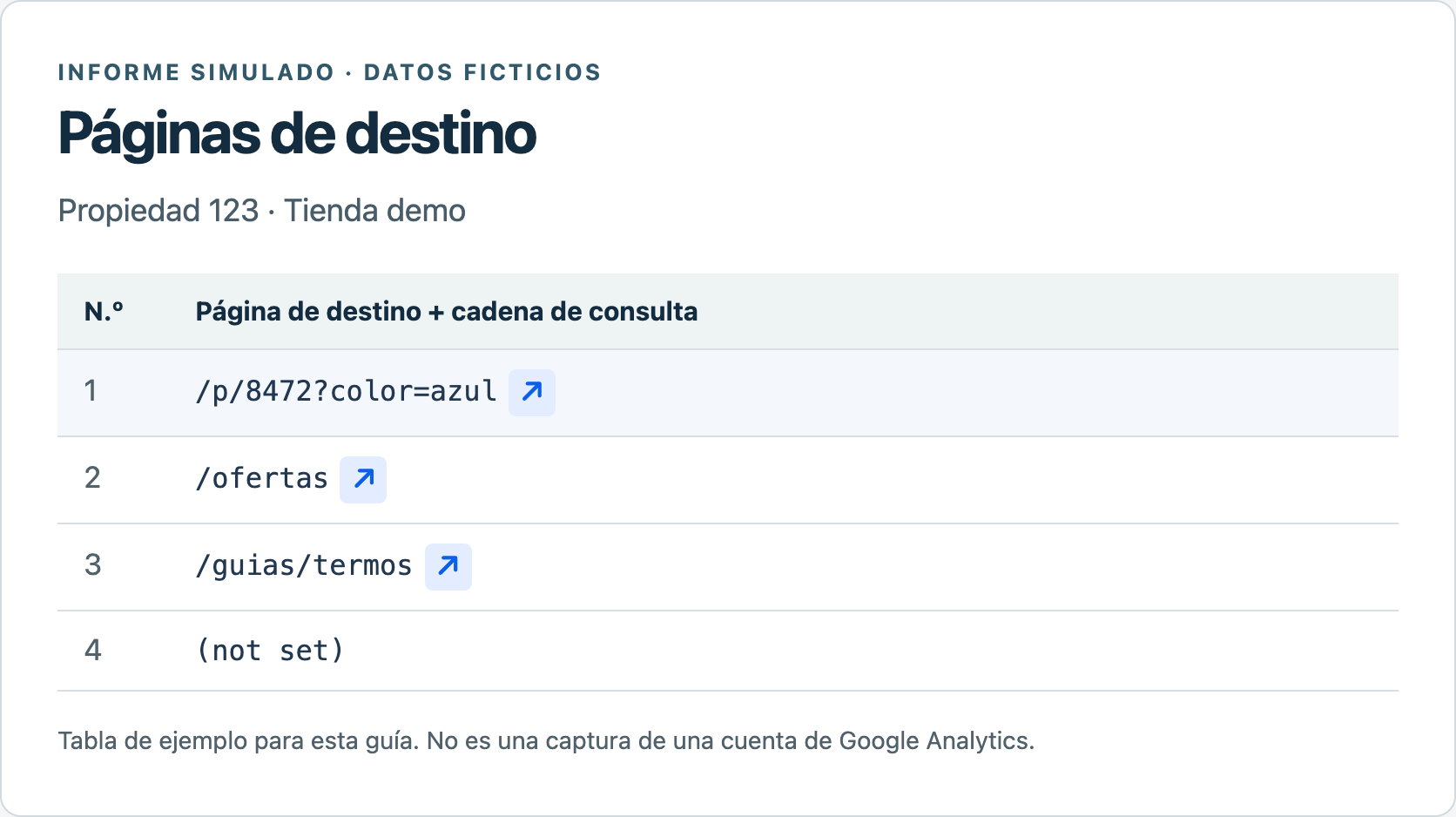
The row `/p/8472?color=azul` gives a clue about the color, but it doesn't tell you what the product is or which store sells it. **[GA4 Page Links](https://github.com/martingaray/ga4-page-links/releases/tag/v0.2.0)** is a free [CookingMetrics](https://cookingmetrics.com/) extension developed by Martín Garay. It adds an **↗** arrow next to recognized paths in Google Analytics reports. Click the arrow to open the page in a new tab and keep your place in the report.
The choice that matters is where the domain comes from. A property that measures one store can use a fixed domain. If the property measures several sites, the same path may lead to different pages.
## At a glance
- The arrow combines a domain with the path in the row. It keeps any query parameters shown there; it cannot infer a missing color or size.
- If one property measures several sites, add **Hostname** to the table and enable the per-row option. Without that column, the extension uses the saved domain.
- For a first test, use a product you recognize. Check the domain, path and variant. Version 0.2.0 was tested with simulated reports; it has yet to be validated in a signed-in Analytics report.
## Which page does the arrow open?
[Pages and screens](https://support.google.com/analytics/answer/12926732?hl=en) shows pages visited at any point in a session. To identify the first page in a session, use the [Landing page report](https://support.google.com/analytics/answer/12931766?hl=en). In either case, choose a dimension that shows a **web path**: the part of the address after the domain. To distinguish product variants, choose a dimension that also shows the query string, the part that starts with `?`.
The report is fictitious. The extension added the arrows; the original row text still works as it did before. The screenshots in this guide are in Spanish.
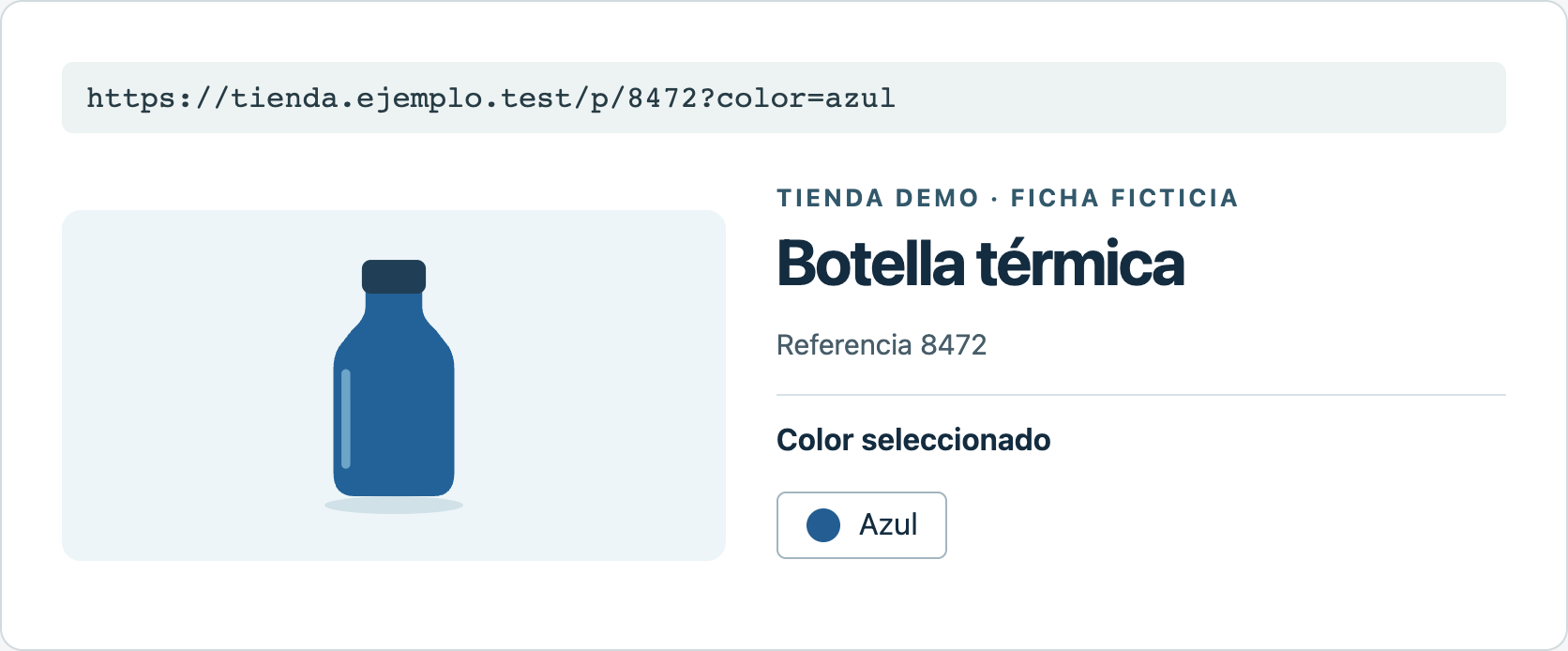
In the first row, the extension combined `/p/8472?color=azul` with the domain saved for the test property. It opened `https://tienda.ejemplo.test/p/8472?color=azul`. The code alone didn't identify the product; the page showed an insulated bottle with the blue variant selected.
The product page is also a demo. In a real store, the link opens the page as it exists today; it cannot recreate the version the visitor saw.
[Section for signed-in readers, level C: https://cookingmetrics.com/blog/ga4-page-links/#bloque-1]
## Install the extension and test the first row
1. In **desktop Chrome** (version 114 or later), [download GA4 Page Links 0.2.0 from GitHub (ZIP)](https://github.com/martingaray/ga4-page-links/releases/download/v0.2.0/ga4-page-links.zip). Extract the files to a folder you can keep.
2. Enter `chrome://extensions` in the address bar. Turn on **Developer mode**, choose **Load unpacked** and select the folder containing `manifest.json`. See the [installation screenshot](https://cookingmetrics.com/assets/blog/ga4-page-links/03-instalacion.png) or [Chrome's instructions for loading a local extension](https://developer.chrome.com/docs/extensions/get-started/tutorial/hello-world#load-unpacked).
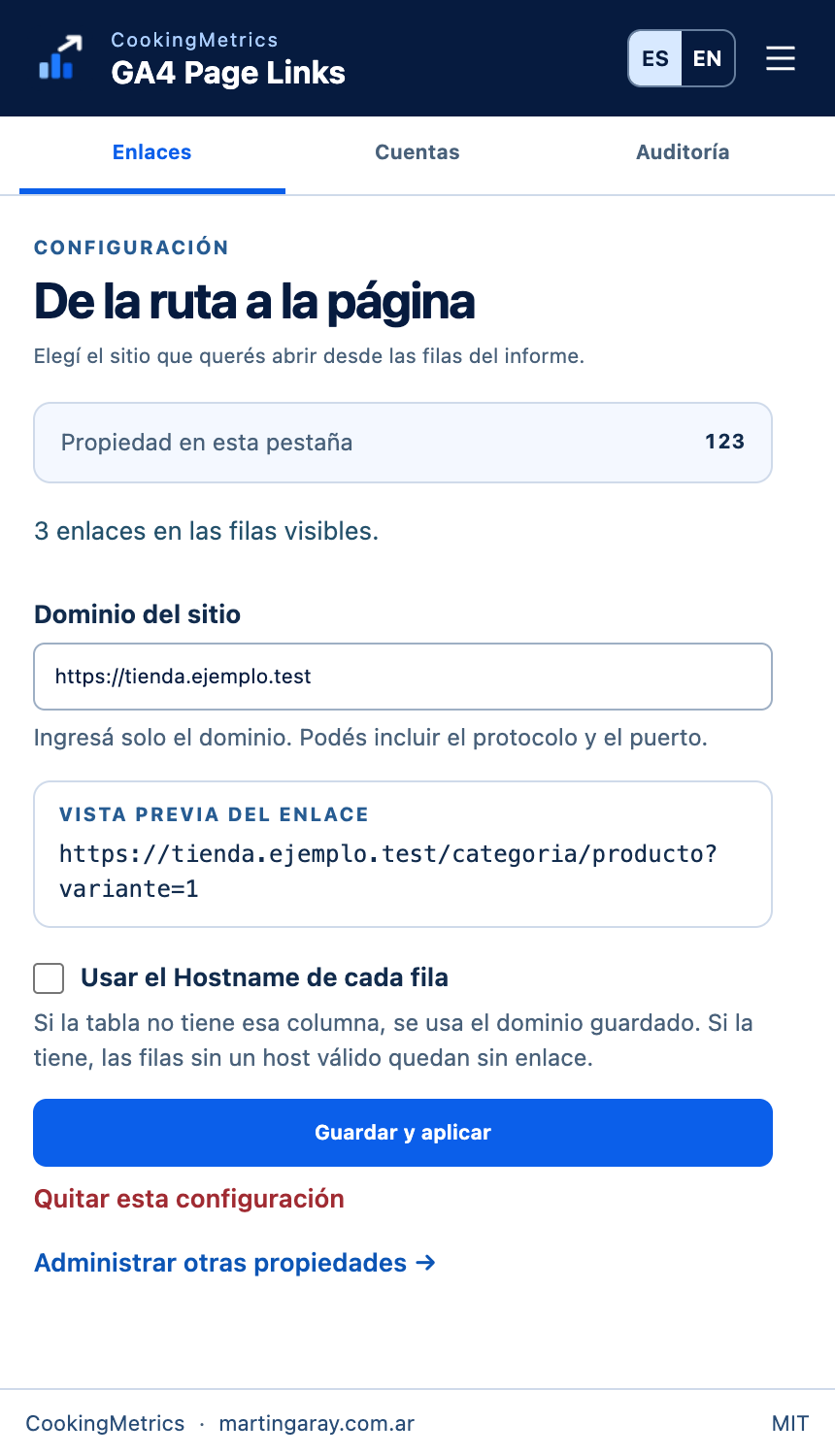
3. Reload the report tab if it was already open. Open **GA4 Page Links** from Chrome's extensions menu and select **Links**. Check the number under **Property in this tab** before saving the domain.
4. Enter the site's domain only, such as `https://tienda.ejemplo.test`, without the product path. Review the preview, choose **Save and apply**, then click the arrow next to a familiar row. In the new tab, check the domain, path and, where relevant, the selected variant.
The number identifies the open property. A property without a saved domain does not inherit one from the previous property.
## Multiple properties or multiple domains?
**Two clients, two properties.** In **Accounts**, each entry uses a numeric property ID, not the measurement ID that starts with `G-`. In the [sample directory](https://cookingmetrics.com/assets/blog/ga4-page-links/06-cuentas.png), the store is property 123 and the magazine is property 456. To prepare another entry without opening its report, choose [Add property](https://cookingmetrics.com/assets/blog/ga4-page-links/07-agregar-propiedad.png). An optional name makes it easier to find the entry later. This changes only the local directory.
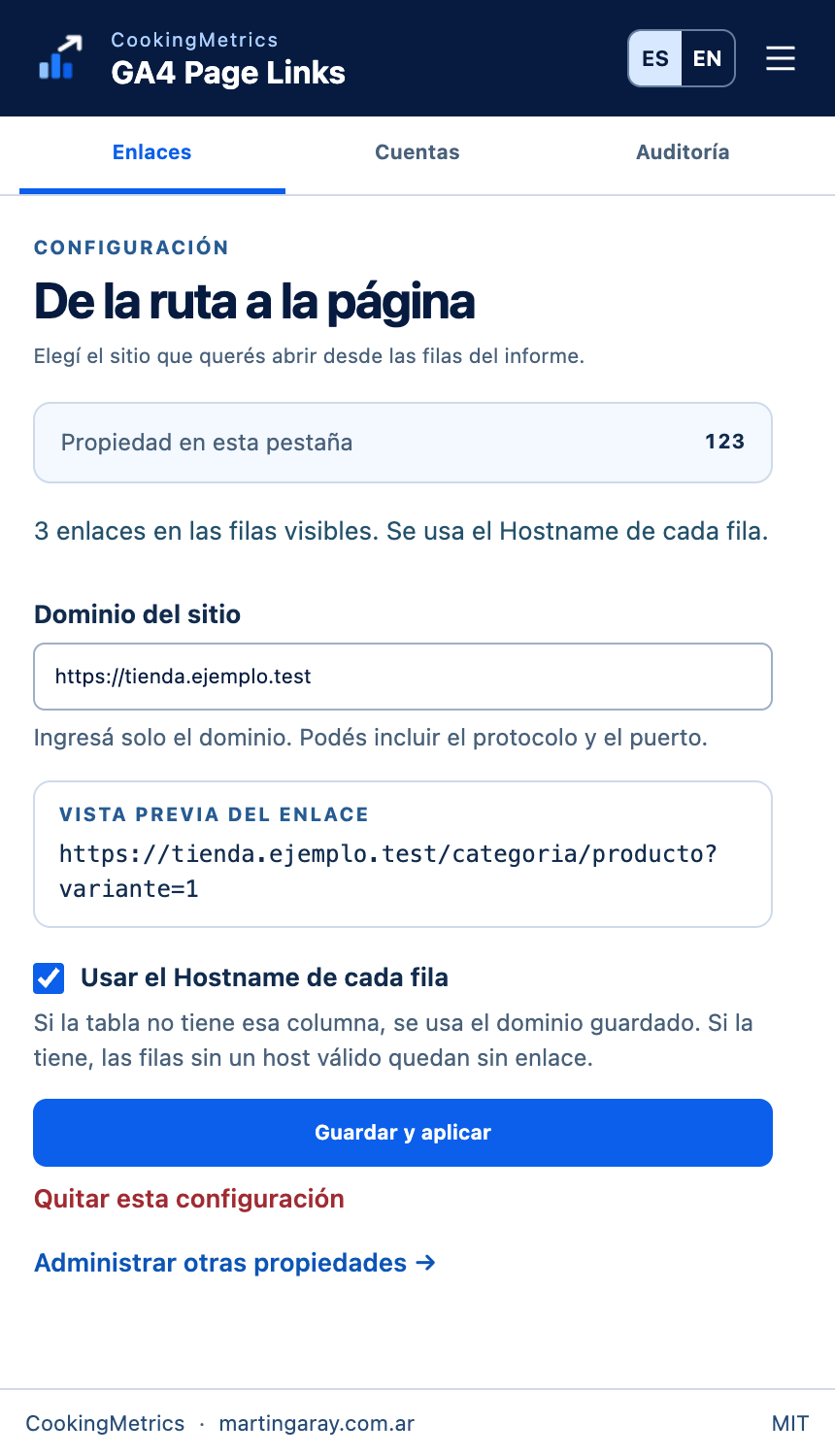
**One property, two sites.** Suppose the store and the magazine share a property and both have an `/ofertas` page. A fixed domain would send both rows to the same address. Add **Hostname** as a secondary dimension in the same table and enable **Use the Hostname of each row**. A magazine row with the path `/guias/termos` can then open on `revista.ejemplo.test` even when the saved domain is the store's.
The option reads a column already in the table. The extension does not add the dimension to the report.
Two cases are easy to confuse. **If the column is absent**, the extension uses the saved domain. **If the column exists but a row's hostname is empty or invalid**, that row gets no arrow. For a property spanning several sites, a page that loads is only half the check: the domain must match that row. The [version 0.2.0 user guide](https://github.com/martingaray/ga4-page-links/blob/v0.2.0/docs/HELP.md) documents both cases.
[Section for signed-in readers, level C: https://cookingmetrics.com/blog/ga4-page-links/#bloque-2]
## What the test established
The [version 0.2.0 validation](https://github.com/martingaray/ga4-page-links/blob/v0.2.0/docs/VALIDATION.md) used Chrome on macOS, with simulated domains and reports. In the example shown here, three paths received arrows and `(not set)` did not. The bottle opened in a new tab with `?color=azul` intact. Signed-in Analytics reports, Windows and Linux remain unverified.
For a team trial, start with a row whose destination you know. If the catalog distinguishes colors but the row shows only `/p/8472`, the extension cannot recover the missing color from the ID. If the question is how the variants are grouped in a product catalog, the [Merchant Center attributes guide](https://cookingmetrics.com/blog/atributos-conversacionales-merchant-center/) covers that separate issue.
[Section for signed-in readers, level C: https://cookingmetrics.com/blog/ga4-page-links/#bloque-3]
## Frequently asked questions
### Why is there no arrow next to a row?
Check the [Help panel](https://cookingmetrics.com/assets/blog/ga4-page-links/09-ayuda.png) and the dimension selected for the table. Version 0.2.0 recognizes English and Spanish dimension names and needs a complete path starting with `/`. A page title, screen class, total, `(not set)` or a truncated path with no full value does not supply a usable address. If the dimension is supported, check that the open property has a saved domain and reload the report.
### What if the link opens a different page or returns a 404?
Compare the domain and the path in the row with the address the extension tried to open. If they match, check the current destination: the site may redirect to another product or may have removed the page. The extension does not test availability or explain a change in sales. To find out whether a crawler can reach the product page, use a separate [bot access test](https://cookingmetrics.com/blog/test-accesibilidad-bots-ia/).
### What does the extension store, and what does Audit do?
The property directory and language setting stay in the browser. The extension does not store report rows or metrics. The [Audit tab](https://cookingmetrics.com/assets/blog/ga4-page-links/08-auditoria.png) opens the [CookingMetrics self-check](https://cookingmetrics.com/google-analytics-self-check/#checklist) when you select it. This is a manual review; the panel does not send the property ID, configured domain or row data to the checklist. To [report an unsupported dimension on GitHub](https://github.com/martingaray/ga4-page-links/issues), include its name, the report language and a fictitious path.
---
## About the author
**[Martín Garay](https://cookingmetrics.com/about-martin-garay/)** — Founder of CookingMetrics
I'm Martín Garay, founder and Martech Advisor at CookingMetrics and Chair of the Technology Committee at CACE, Argentina's ecommerce chamber. For more than 20 years I've worked in Analytics, development, technical SEO and ecommerce: I implement measurement, find where it breaks and turn it into information you can act on.
### My work at CACE, Argentina's ecommerce chamber
- **Chair of the Technology Committee** (SINCE AUGUST 2025): I set the committee's agenda together with Gabriel Topola, vice-chair. We look at the platforms and tools an online business needs to grow: CMS, integrations, customer service and omnichannel operations.
- **Curating the technical forum** (IT CAMP · ECOMMERCE DAY ARGENTINA): With CACE's Events team I put together the IT Camp programme: talks for engineering and development teams on platform architecture, code and good practice, given by speakers who do the implementation work.
- **Marketing and Data Analytics committees** (SINCE 2016): I started in the Marketing committee and helped create the Data Analytics committee. I gave Google Analytics webinars, including the migration to GA4, and worked on the Google Analytics implementation for Hot Sale and Cyber Monday.
- **Ecommerce metrics dashboard** (FOR MEMBERS): With the Data Analytics committee and the CACE Community team we built a dashboard in Google Analytics and Looker Studio so each member can check the key indicators of their own store.
### Talks
- [From SEO to GEO: what it takes for a brand to be cited by an answer engine](https://www.youtube.com/watch?v=mlyjuSBdMzI) — ECOMMERCE DAY ARGENTINA 2026 · IT CAMP · AUGUST 27, 2026 · BUENOS AIRES CONVENTION CENTER
- [SEO for AI: how to prepare a brand to show up in ChatGPT and Google's AI overviews](https://www.youtube.com/watch?v=4dI7jqnLg-M) — AI IN LATAM 2025 · BUENOS AIRES · OVER 3,500 ATTENDEES AND 100 SPEAKERS, PER THE ORGANIZERS
### Profiles and links
- [Full profile](https://cookingmetrics.com/about-martin-garay/)
- [LinkedIn](https://www.linkedin.com/in/seospecialistmartingaray/)
- [Instagram](https://www.instagram.com/garaymartin/)
- [YouTube](https://www.youtube.com/@MartinGaray)
- [martingaray.com.ar](https://www.martingaray.com.ar/)
- [Chair of the Technology Committee at CACE, Argentina's ecommerce chamber](https://cace.org.ar/pages/comision-de-tecnologia?utm_source=cookingmetrics.com&utm_medium=referral&utm_campaign=perfil-martin&utm_content=caja-autor)
- [Ecommerce metrics dashboard, free for CACE members](https://cace.org.ar/pages/dashboard-de-metricas?utm_source=cookingmetrics.com&utm_medium=referral&utm_campaign=perfil-martin&utm_content=caja-autor)
---
## About CookingMetrics
CookingMetrics provides Google Analytics consulting, measurement implementation and SEO. Founder Martín Garay brings more than 20 years of experience in Analytics, development and ecommerce. The work connects data with business decisions.
### Services
- **[Google Analytics audit](https://cookingmetrics.com/data-analytics-consulting/)**: Do purchases or revenue differ from your store? We review your measurement and deliver a correction plan in 10 business days. [See the audit scope](https://cookingmetrics.com/data-analytics-consulting/).
- **[Google Tag Manager](https://cookingmetrics.com/services/gtm/)**: Did events stop being tracked after a website change? We review tags, triggers and versions to find duplicates or missing data. [Ask about Google Tag Manager audits and implementation](https://cookingmetrics.com/services/gtm/).
- **[Server-side measurement](https://cookingmetrics.com/services/cookieless-tracking/)**: We assess how to send data from your server, respect consent and prevent duplication. [What's included in server-side measurement](https://cookingmetrics.com/services/cookieless-tracking/).
- **[Technical SEO](https://cookingmetrics.com/services/technical-seo/)**: Have you migrated your site, or are pages missing from Google? We review crawling, indexing, structure and performance. [How we approach technical SEO](https://cookingmetrics.com/services/technical-seo/).
- **[SEO for AI search (GEO)](https://cookingmetrics.com/services/seo-ai-geo/)**: We review whether search engines and assistants can access your pages and understand their content. [What we can improve for AI search](https://cookingmetrics.com/services/seo-ai-geo/).
### Solutions
- **[Google Analytics self-check](https://cookingmetrics.com/google-analytics-self-check/)** (Status: Available)
- **[GA4 Report Generator](https://cookingmetrics.com/product/ga4-report-generator/)** (Status: Beta): A tool in beta that already generates Google Analytics reports. Ask about available features and the scope for your project. [Explore GA4 Report Generator](https://cookingmetrics.com/product/ga4-report-generator/).
- **[IndexNow Connect](https://cookingmetrics.com/product/indexnow-connect/)** (Status: Available for Tiendanube): Notifies search engines participating in IndexNow of new, updated or deleted URLs. [How IndexNow Connect works](https://cookingmetrics.com/product/indexnow-connect/).
- **[AI SEO Analysis](https://cookingmetrics.com/product/ai-seo-analysis/)** (Status: In development): *Coming soon.* An automated audit of how AI assistants and search engines access and use your content. [Learn about AI SEO Analysis](https://cookingmetrics.com/product/ai-seo-analysis/).
**Let's talk about your measurement:** [Book a call](https://cookingmetrics.com/about-martin-garay/) · [CookingMetrics](https://cookingmetrics.com/)